Posts

Showing posts with the label shell

GTU OS Program - 16 Multiplication Table Generator

Image
16. Write a shell script to display multiplication table of given a number. Start by creating a new file called multi_table.sh using vim Complete code of the program echo "Multiplication Table " read -p "Enter the number : " n i=0 for((i=1;i<11;i++)) do echo "$n X $i = " "`expr $n \* $i`" done Interpreting the multi_table.sh file and executing it in terminal tkanu025@hp:~/lab_solutions$ chmod +x multi_table.sh tkanu025@hp:~/lab_solutions$ ./multi_table.sh Output Previous Program gtu os lab manual, os GTU Practical, operating system Programs, Operating system shellscript programs, Gtu study material 3140705, OS 3140702, os practical list, shell script programming, gtu os practical, os lab solution gtu

GTU OS Program - 15 Process creation

15. Write a program for process creation using C. (Use of gcc compiler) Start by creating a new file called process.c using vim Complete code of the program #include <stddef.h> #include <stdlib.h> #include <unistd.h> #include <sys/types.h> #include <sys/wait.h> /* Execute the command using this shell program. */ #define SHELL "/bin/sh" int my_system (const char *command) { int status; pid_t pid; pid = fork (); if (pid == 0) { /* This is the child process. Execute the shell command. */ execl (SHELL, SHELL, "-c", command, NULL); _exit (EXIT_FAILURE): } else if (pid < 0 ) //the fork failed. Report failure status = -1; else // this is the parent process. It waits for the child process to complete if (waitpid (pid, &status, 0) != pid) ...

GTU OS Program - 14 AWK program

Image
14. Write an awk program using function, which convert each word in a given text into capital. First of all what is awk ? Awk is a utility that enables a developer to write small but effective programs in the form of statments. Using awk we can scan a file line by line, transform data files, compare input lines to a defined pattern, etc. Complete code of the program read -p "Enter a lowercase String : " string echo "Resultant Upercase string is : " echo "$string" | awk '{print toupper($0)}' Interpreting the upper.sh file and executing it in terminal tkanu025@hp:~/lab_solutions$ chmod +x upper.sh tkanu025@hp:~/lab_solutions$ ./upper.sh Output Previous Program Next Program gtu os lab manual, os GTU Practical, operating system Programs, Operating system shellscript programs, Gtu study material 3140705, OS 3140702, os practical list, shell script programming, gtu os practical, ...

GTU OS Program - 13 Date Validator

Image
13. Write a shell script to validate the entered date. (eg. Date format is : dd-mm-yyyy). Complete code of the program echo "Date validator" #Initializing values of date, month and year dd=0 mm=0 yy=0 #initializing no of days in a month days=0 read -p "Enter day (dd) : " dd read -p "Enter Month (mm) : " mm read -p "Enter Year (yyyy) : " yy #checking for invalid month if [ $mm -le 0 -o $mm -gt 12 ] then echo "$mm is invalid month. " exit 1 fi #finding out no. of days in a month case $mm in 1 | 3 | 5 | 7 | 8 | 10 | 12) days=31 ;; 2) days=28 ;; 4 | 6 | 9 | 11) days=30 ;; *) days=-1 ;; esac #checking for leap year if [ $mm -eq 2 ] then a=`expr $yy % 4` b=`expr $yy % 100` c=`expr $yy % 400` if [ $a -eq 0 -a $b -ne 0 -o $c ...

GTU OS Program - 12 UNIX shell & Environment variables

Image
12. Study of Unix Shell and Environment Variables. A shell provides us with an interface to the unix system. It takes input from us and executes programs based on that input. Shell is an environment where we can run our commands, programs and shell scripts. There are different types of Shell as there are different types of operating systems. Shell Prompt The prompt $ which is called the command prompt, is issued by the shell. While the prompt is displayed, you can type a command. Types of shells Bourne shell In this type of shell the $ character is the default prompt. Subcategories of Bourne shell Bourne shell (sh) Korn shell (ksh) Bourne Again shell (bash) POSIX shell (sh) C shell In this type of shell the % character is the default prompt. Sub categories of C-type shell C Shell (csh) TENEX/TOPS C shell (tcsh) Environment Variables Environment Variables are variables that are set up in y...

GTU OS Program - 11 Filters

Image
11. Shell programming using filters (including grep, egrep, fgrep). The programs that take plain text as standard input and transforms it into a meaningful format, and then returns it as a standard output is known as Filters. Some of the most commonly used filters are explained below: cat head tail sort uniq wc grep tac sed nl 1. cat: Displays the text of the file line by line. Syntax cat [path] Output 2. head: Displays the first n lines of the specified text files. If the number of lines is not specified then by default prints first 10 lines. Syntax head [-number_of_lines_to_print] [path] Output 3. tail: It works the same way as head, but in reverse order. It returns the lines from bottom to up Syntax tail [-number_of_lines_to_print] [path] Output 4. sort: sorts the lines alphabetically by default but we can customize the ...

GTU OS Program - 9

Image
9. Write a shell script to display all executable files, directories and zero sized files from current directory. First of all let's understand the meaning of terms like exectable files, directories and zero sized files Executable Files means the files that can be exeuted. It is used to perform various functions or operations on a computer. Unlike a data file, an executable file cannot be read because it's compiled. For example executable files in a microsoft windows os is .exe file on maacOS its .dmg and .app. directories means folders Zero sized files are those having its size equal to 0. for displaying executable files we will use find <dirname> -executable -type f command creating a new file display_info.sh using vim tkanu025@hp:~$ vim display_info.sh Complete code of the program echo "Executable files" files="$(find lab_solutions -executable -type f)" echo "$files" echo echo "List of Direct...

GTU OS Program - 8

Image
8. Write a shell script to read n numbers as command arguments and sort them in descending order. Complete code of the program read -p "Enter the number of values you want to sort " n for((i=0; i<$n; i++)) do read -p "Enter value of arr[$i]: " arr[$i] done #sorting code for((i=0; i<$n; i++)) do for((j=0; j<n-i-1; j++)) do if [ ${arr[j]} -lt ${arr[$((j+1))]} ] then #swapping temp=${arr[j]} arr[$j]=${arr[$((j+1))]} arr[$((j+1))]=$temp fi done done echo "Numbers sorted in descending order as" echo ${arr[*]} Interpreting the sort.sh file and executing it in terminal tkanu025@hp:~/lab_solutions$ chmod +x sort.sh tkanu025@hp:~/lab_solutions$ ./sort.sh Output Previous Program Next Program gtu os lab manual, os GTU Practical, opera...

GTU OS Program - 7

Image
7. Write a menu driven shell script which will print the following menu and execute the given task. MENU 1) Display calendar of current month 2) Display today’s date and time 3) Display usernames those are currently logged in the system 4) Display your name at given x, y position 5) Display your terminal number 6) Exit Complete code of the program i=0 while [ $i != 6 ] do echo "Menu 1. Display calender of current Month 2. Display today's date and time 3. Display usernames of those who are currently logged in the ststem 4. Display your name at given x, y position 5. Display Terminal Number 6. Exit Choose your option and enter corresponding value" read i case "$i" in 1) calender="$(cal)" echo "Here is your Calender " echo "$calender" ;; 2) current="$(date)" ...

GTU OS Program - 10

Image
10. Write a shell script to check entered string is palindrome or not. Complete code echo "Enter the string to check: " read str len=`echo $str | wc -c` len=`expr $len - 1` i=1 j=`expr $len / 2` while test $i -le $j do k=`echo $str | cut -c $i` l=`echo $str | cut -c $len` if test $k != $l then echo "String is not Palindrome" exit fi i=`expr $i + 1` len=`expr $len - 1` done echo "String is Palindrome" Interpreting the palindrome.sh file and executing it in terminal tkanu025@hp:~/lab_solutions$ chmod +x palindrome.sh tkanu025@hp:~/lab_solutions$ ./palindrome.sh Output Previous Program Next Program gtu os lab manual, os GTU Practical, operating system Programs, Operating system shellscript programs, Gtu study material 3140705, OS 3140702, os practical list, shell script programming, gtu os practical, os lab...

GTU OS Program - 6

Image
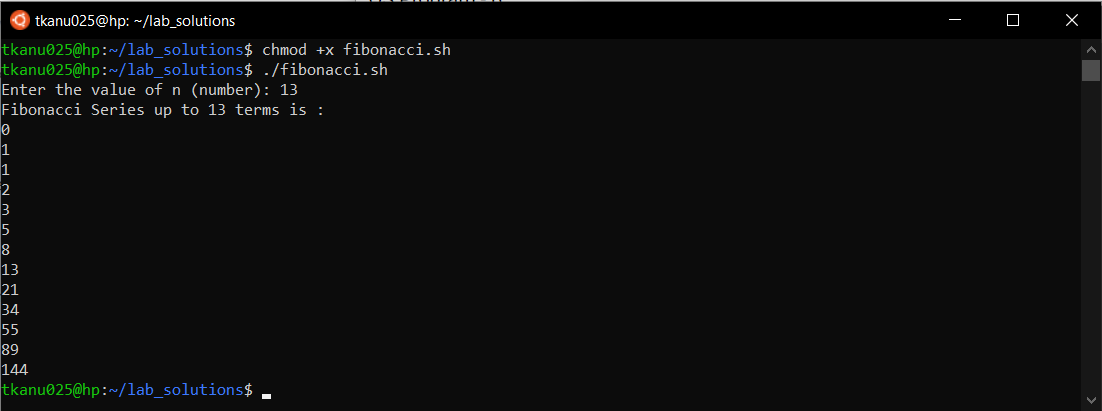
6. Write a shell script which will generates first n fibonacci numbers like: 1, 1, 2, 3, 5, 13,… Complete code of the program read -p "Enter the value of n (number): " n x=0 y=1 i=2 echo "Fibonacci Series up to $n terms is : " echo "$x" echo "$y" while [ $i -lt $n ] do i=`expr $i + 1` z=`expr $x + $y` echo "$z" x=$y y=$z done Interpreting the fibonacci.sh file and executing it in terminal tkanu025@hp:~/lab_solutions$ chmod +x fibonacci.sh tkanu025@hp:~/lab_solutions$ ./fibonacci.sh Output Previous Program Next Program gtu os lab manual, os GTU Practical, operating system Programs, Operating system shellscript programs, Gtu study material 3140705, OS 3140702, os practical list, shell script programming, gtu os practical, os lab solution gtu

GTU OS Program - 5

Image
5. Write a shell script which will accept a number and display first n prime numbers as output. Complete code of the program read -p "Enter the value of n (or range) " n echo "The prime numbers are: " m=2 while [ $m -le $n ] do i=2 flag=0 while [ $i -le `expr $m / 2` ] do if [ `expr $m % $i` -eq 0 ] then flag=1 break fi i=`expr $i + 1` done if [ $flag -eq 0 ] then echo $m fi m=`expr $m + 1` done Interpreting the prime.sh file and executing it in terminal tkanu025@hp:~/lab_solutions$ chmod +x prime.sh tkanu025@hp:~/lab_solutions$ ./prime.sh Output Previous Program Next Program gtu os lab manual, os GTU Practical, operating system Programs, Operating system shellscript programs, Gtu study material 3140705, OS 314070...

GTU OS Program - 4

Image
4. Write a shell script to find factorial of given number n. As we have done this program many times in our programming career the logic will be same but there will be some changes in syntax. Start by creating a new file called factorial.sh using vim tkanu025@hp:~/lab_solutions$ vim factorial.sh Complete code of the program fact=1 read -p "Enter a number to find its factorial : " n #if entered value is less than 0 if [ $n -le 0 ] then echo "invalid number" exit fi #logic for finding factorial a=$n while [ $a -ge 1 ] do fact=`expr $fact \* $a` a=`expr $a - 1` done echo "Factorial of $n is $fact" Interpreting the factorial.sh file and executing it in terminal tkanu025@hp:~/lab_solutions$ chmod +x factorial.sh tkanu025@hp:~/lab_solutions$ ./factorial.sh And here is the output Previous Program Next Program gtu os lab manual, os GTU Practical, operating system Programs, Operat...

GTU OS Program - 3

Image
3. Write a shell script to generate marksheet of a student. Take 3 subjects, calculate and display total marks, percentage and Class obtained by the student. Make a file called marksheet.sh using vim. If you want a full guide to vim than you can check this post. tkanu025@hp:~/lab_solutions$ vim marksheet.sh When you will hit enter than it will open a window like the one below. This is an editor and Here you can write your code. Press i to enter into the insert mode Write full code there like this echo "Enter marks(out of 30) of " read -p "Subject 1: " s1 read -p "Subject 2: " s2 read -p "Subject 3: " s3 sum=`expr $s1 + $s2 + $s3` echo "Sum of marks of 3 subjects is : "$sum per=`expr $sum \* 10 / 9` echo "Percentage: "$per if [ $per -ge 60 ] then echo "you got Distinction" elif [ $per -ge 50 ] then echo "you got First class" elif [ $per -ge 40 ] then ...

YouTube